Localization
Localize your App Store screenshots
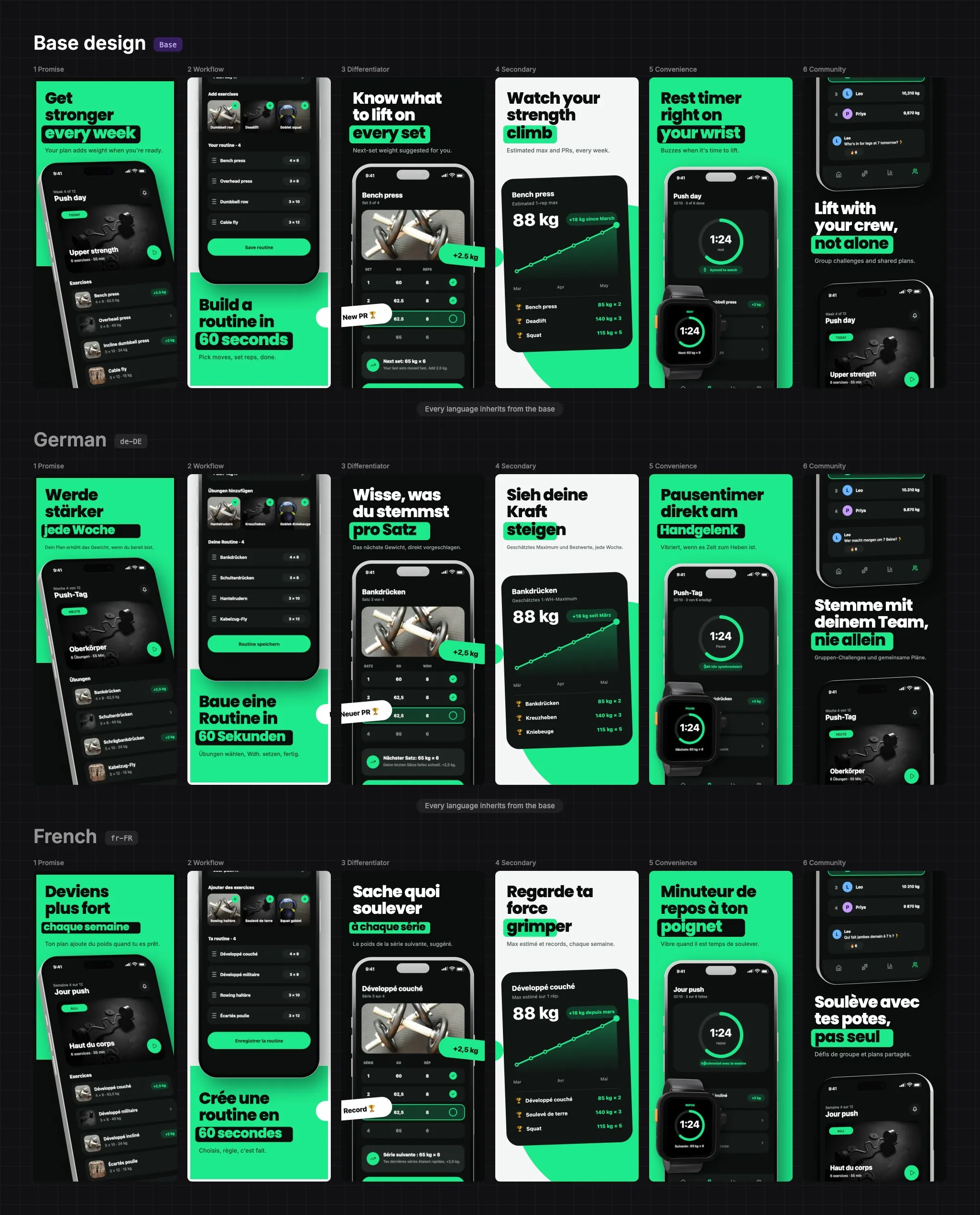
Design a screenshot set once, then translate it into every language you ship in. Each language is a patch on the base design, so you only change what is different.
How localization works
Pick the store languages you ship in, then switch between them on the canvas and translate each headline in place. A language inherits everything from the base design and only keeps the properties you changed.
- 01
Design the base
Build the English (or any language) design once: devices, backgrounds, headlines and badges.
- 02
Add languages
Choose from 27 store locales, such as German, French, Spanish, Italian, Portuguese, Dutch, Japanese, Korean and Arabic.
- 03
Translate in place
Switch to a language and edit the text. Make a longer word fit by lowering its font size for that language only.
- 04
Export a folder per language
One export writes every screen in every language, in folders named with the store locale code.
What you can change per language
- Text: the headline, subtitle and any badge or label.
- Size and style: a smaller font so a long German word still fits.
- Images and device screens: swap the app screenshot inside a phone for one in that language.
- Backgrounds: a different colour or gradient for a single language.
- Everything else follows the base. Edit the base and every language that has not overridden that property follows it.
Right-to-left languages
Arabic and other right-to-left scripts render with the correct text direction in the editor and in the export.
Export for the stores
Language folders use the same locale codes App Store Connect and Google Play expect, such as de-DE and fr-FR. Export a standard zip, or write the exact folder layout fastlane reads and upload with one command.
Frequently asked questions
How many languages can I localize screenshots into?
27 store locales, including English (US and UK), German, French, Spanish, Spanish (Mexico), Italian, Portuguese (Brazil), Dutch, Swedish, Danish, Norwegian, Finnish, Japanese, Korean and Arabic.
Do I have to rebuild the design for every language?
No. Each language is a patch on the base design. You only change the text, images or backgrounds that differ, and the rest follows the base.
Can I show a different app screenshot in each language?
Yes. Swapping the screen shown inside a device applies to that language only, so each store listing can show a localized app.
Does it support right-to-left languages?
Yes. Arabic and other right-to-left scripts use the correct text direction in the editor and in the exported images.
What do the exported language folders look like?
One folder per language, named with the store locale code, each holding every screen at every size you chose. Export for fastlane to get the layout deliver and supply read.